 Skip to content


Last Updated: October 30, 2026
Quick Summary
To reset key fob synchronisation after a battery change, sit in the driver’s seat with all doors closed, turn the ignition to the position just before the engine starts, then press and hold the lock button for about five seconds. Release it, press unlock twice, switch off the ignition and test the buttons.
- A battery change does not usually erase key programming; the transponder chip keeps its code without power.
- Match the battery type exactly, check polarity and straighten bent contacts before attempting any reset.
- Stop after two failed reset attempts, as repeated wrong tries can trigger a security delay.
- If the spare fob works, the fault lies in the original fob rather than the vehicle receiver.
- Doors that unlock but an engine that will not start point to a transponder or immobiliser fault, not the remote.
Table of Contents
- Why a Key Fob Stops Working After a Battery Change
- How to Replace a Car Key Fob Battery Correctly
- Do You Need to Reprogramme a Key Fob After Battery Replacement?
- Step-by-Step: How to Reset a Key Fob After a Battery Change
- Key Fob Not Working After Battery Change? Work Through This Checklist
- How to Programme a Car Key Fob When a Reset Is Not Enough
- When to Stop and Call an Automotive Locksmith
- Frequently Asked Questions
Why a Key Fob Stops Working After a Battery Change
A key fob that stops working after a battery change is usually suffering from one of three separate problems: a flat or wrongly fitted battery, a lost remote signal, or an immobiliser that no longer recognises the key, so knowing how to reset key fob faults starts with telling these apart. Most drivers assume the fob is broken. Most of the time, it is not.
Here is the part that matters. A key fob is a small radio transmitter. It sends a coded signal to your vehicle. The car checks that code before it unlocks the doors or allows the engine to start.
When you swap the battery, that signal can drop out of sync. The fob still works. The car just stops listening to it.
Battery failure versus lost synchronisation versus immobiliser programming
These three faults look identical from the driver’s seat. They are not.
- Battery failure: the fob is dead. No lights, no response, nothing.
- Lost synchronisation: the fob has power but the car rejects the remote signal.
- Immobiliser programming: the transponder chip inside the key is no longer matched to the vehicle.
The first is a hardware fix. The second is a reset. The third usually needs key programming equipment.
Getting this wrong wastes time. Drivers replace a perfectly good battery twice, then pay for a recovery they did not need.
If you want the technical background on how the chip and the immobiliser work together, read our guide on what a transponder key immobiliser system is.
How to Replace a Car Key Fob Battery Correctly
Most failed battery changes come down to fit, not fault. A replacement battery of the wrong type, inserted the wrong way round, will leave the fob dead even when it is brand new.
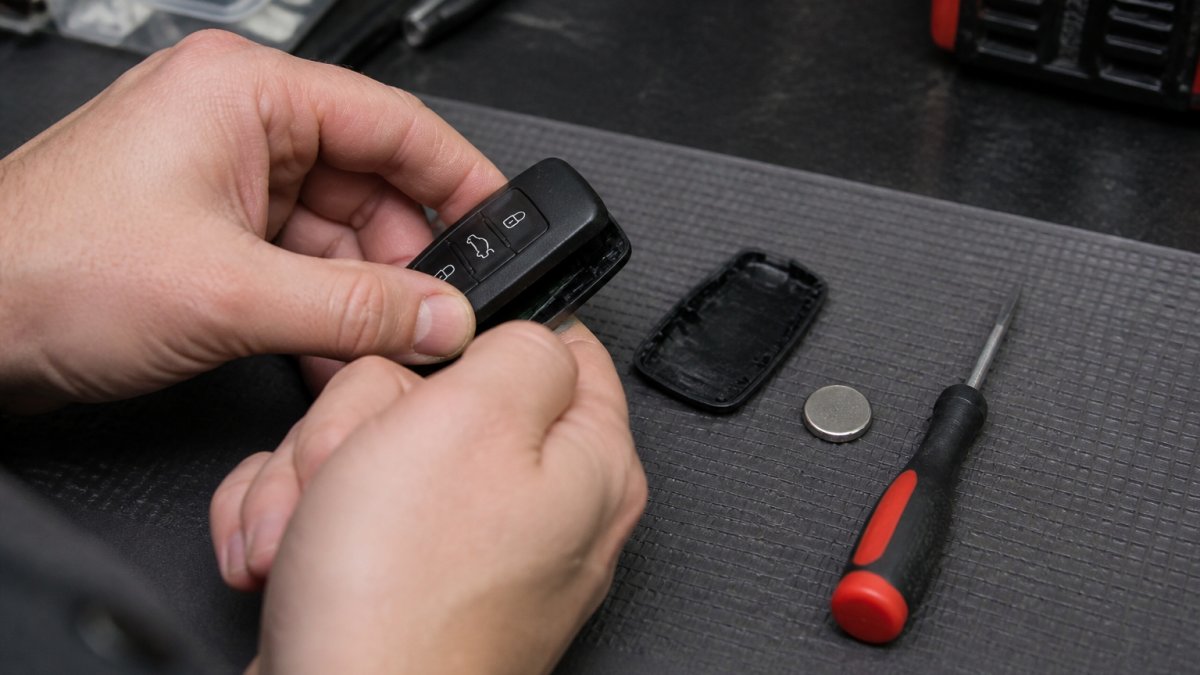
Checking battery type, polarity and contact fit
Work through these checks before you close anything up:
- Match the battery type exactly. Read the number on the old coin-cell battery (CR2032, CR2025 and CR1620 are common) and buy the same one. A thinner cell will not make contact.
- Check the polarity. The plus sign faces up in most fobs. Look at the moulded markings inside the battery slot.
- Inspect the battery contacts. Bent metal tabs are a common cause of a dead fob. Gently straighten them.
- Seat the battery flat. It should sit level in the battery slot, not tilted.
- Close the fob casing fully. A case that does not click shut means the battery is not held securely.
Test the buttons before you refit the case. If the red light stays dark, stop and recheck steps 1 to 4.
Do You Need to Reprogramme a Key Fob After Battery Replacement?
No, in most cases. A simple battery replacement does not erase the key’s programming.
What often happens is a loss of synchronisation. The remote and the car use a rolling code.
So the honest answer to “do you need to reprogramme a key fob after battery replacement” is: usually not reprogramming, but possibly a reset key fob step.
- Resynchronise: a short button or ignition sequence you can often do yourself.
- Reprogramme: matching a key to the vehicle with diagnostic equipment.
One more thing. If the fob was already failing before the battery died, the battery was never the problem.
Step-by-Step: How to Reset a Key Fob After a Battery Change
Here is the general method for how to reset a key fob after a battery change. Treat it as a starting point, not a guarantee.
Important caveat: reset procedures vary by make, model and year. Always check your vehicle handbook first. The sequence below suits many common vehicles but will not work on all of them. Manufacturers change procedures between model years, and a method that worked on one vehicle may do nothing on the next.
Using the ignition and lock button to resynchronise
- Sit in the driver’s seat with all car doors closed.
- Insert the physical key into the ignition.
- Turn the ignition to the position just before the engine starts. Do not start the engine.
- Press and hold the lock button on the fob for about five seconds.
- Release, then press the unlock button twice.
- Switch the ignition off and remove the key.
- Test the buttons. The central locking should now respond.
Some vehicles reverse this. You press the lock button first, then turn the key. If nothing happens, try the other order once. Do not repeat the same failed sequence more than twice; on some vehicles, repeated wrong attempts trigger a short security delay.
Keep a window open or a door ajar while you test. If the central locking responds but the fob then locks the car with the keys inside, you will need the spare or a locksmith.
Push-button start and fobs with no physical key
No ignition barrel means a different approach. Try these in order:
- Hold the fob against the start button and press the brake. Many cars read the chip this way.
- Look for a marked emergency slot in the cabin, often in the centre console or under a trim cap.
- Use the hidden physical key inside the fob to unlock the door manually, then start the car with the fob pressed to the button.
Watch out: on some keyless vehicles, a failed reset locks the fob out completely. Repeated wrong attempts can trigger a security delay. If two or three tries fail, stop and get professional help.
When the first sequence fails: a decision path
Use this order before assuming the fob is faulty:
- Recheck the battery fit. Wrong type, reversed polarity or a bent contact will mimic a failed reset. See the battery checks above.
- Try the alternate button order once. Lock-then-ignition versus ignition-then-lock.
- Test the spare fob. If the spare works, the fault is in the fob, not the vehicle receiver.
- Check the handbook for a model-specific sequence. Some vehicles need a door-open or hazard-light step that generic guides omit.
- Stop after two failed attempts. Further tries risk a security delay and waste time. Move to professional diagnosis.
A reset is a short resynchronisation step, not programming. If the fob has power but the car still rejects it after two correct attempts, the next step is diagnosis, not another battery.
Key Fob Not Working After Battery Change? Work Through This Checklist
A key fob not working after a battery change is usually one of six things. Run this checklist in order and you will find the cause faster than guessing.
- Is the battery the correct type and fitted the right way round?
- Are the battery contacts clean, straight and touching the cell?
- Does the fob casing click shut with no gap?
That last point is the quickest diagnostic you have. A working spare proves the vehicle’s receiver and immobiliser are fine.
Battery and fob damage diagnosis before you blame the car
Work through these physical checks before attempting any reset sequence:
- Battery type. Read the number on the old cell (CR2032, CR2025 and CR1620 are common) and fit the same. A thinner cell may not make contact even when new.
- Polarity. The plus sign usually faces up. Check the moulded markings inside the slot.
- Contact condition. Look for bent metal tabs, corrosion or a compressed spring contact. Gently straighten tabs; clean corrosion with a dry cloth.
- Case closure. The casing should click shut with no gap. A loose case means the cell is not held securely.
- Circuit-board damage. Look for cracks, liquid residue or a detached button pad. If the board is damaged, no reset will help.
- Button feel. A button that feels mushy or does not click may be worn through.
If the fob shows no light at all after these checks, the fault is in the fob or the battery, not the vehicle.
A decision tree for troubleshooting and escalation
Use this order to decide when to retry, test a spare, consult the handbook or call a professional:
- No light, no response: recheck battery type, polarity and contacts. If still dead, try a second new battery of the correct type. If still dead, the fob needs repair or replacement.
- Light works, doors do not: run the resynchronise sequence for your make and model once. If it fails, try the alternate button order once. If it still fails, test the spare.
- Spare works: the fault is in the original fob. Stop resetting and book a repair or replacement.
Before you start any reset, note your vehicle’s make, model, year and the battery number you fitted. A locksmith or dealer will ask for these, and having them ready saves time.
If the checklist gets you nowhere, our guide to key cutting and car keys in Swansea covers the wider options, from replacement to repair.
| Symptom | Most likely cause | First action |
|---|---|---|
| No light, no response | Battery flat, wrong type or damaged contact | Check battery type, polarity and contacts |
| Light works, doors do not | Lost synchronisation | Run the reset sequence once |
| Doors work, engine will not start | Immobiliser or transponder fault | Test the spare fob, then seek diagnosis |
| Works only up close | Weak battery or damaged aerial | Replace battery, then retest |
| One button dead | Worn button or circuit board | Professional repair |
| Spare works, original does not | Fault in the original fob | Book repair or replacement |
How to Programme a Car Key Fob When a Reset Is Not Enough
When a reset fails, the key needs programming, not resynchronising. This is where DIY stops being sensible.
Programming means writing the key’s code into the vehicle’s immobiliser memory. It needs diagnostic equipment matched to the make and model.
Here is what most guides miss. The sequence you find online for one model year may not work on the next, as manufacturers can change the procedure.
If you have tried the reset twice and the fob still will not talk to the car, book proper key programming rather than buying another battery. Our team handles car key replacement, programming and repairs.
When to Stop and Call an Automotive Locksmith
Stop when the reset has failed twice, when the fob shows no life at all, or when the engine will not start despite the doors unlocking.
There is also a security angle.
Weigh up your options before you commit. Dealership replacement is one route. Alternatives to dealership car key replacement sets out the other routes open to you.
At EBM Auto Keys, we bring 18 years of motor trade experience to every job. If you are ready to get it sorted, contact EBM Auto Keys and tell us what the fob is doing.
Frequently Asked Questions
Do you need to reprogramme a key fob after battery replacement?
Usually not. In most vehicles the remote keeps its coding when the battery is swapped, and the fob only needs resynchronising so it talks to the car again. A full reprogramme is only needed when the fob has lost its pairing completely, when you fit a replacement fob, or when the immobiliser no longer recognises the transponder chip. Start with a reset sequence and only escalate to programming if the buttons still do nothing.
How do you reset a key fob after changing the battery?
The sequence varies by make, model and year, so check your handbook first. A common method is to sit in the driver’s seat, close the doors, turn the ignition on and off a set number of times, then press and hold the lock or unlock button until the dashboard lights confirm the pairing. Some vehicles use a button combination on the fob itself. If two or three attempts fail, stop, because repeated cycles can lock the system out.
What should you check if a key fob stops working after a battery change?
Check the battery type matches the original, that the polarity is the right way round, and that the coin cell sits flat in its slot with the contacts touching. Look for bent battery contacts, a cracked circuit board or a pinched rubber seal. Confirm the fob casing clicks shut fully. If the buttons feel dead and the red light does not flash, the fault is usually inside the fob rather than the vehicle.
Can a key fob lose its programming when the battery is changed?
It can, though it is less common than people assume. A fob that was already failing, a long period with no battery fitted, or a voltage spike during removal can wipe the pairing. Vehicles with rolling-code central locking are more prone to losing sync. If a reset sequence does not restore the remote signal, the fob needs reprogramming with diagnostic equipment rather than another battery.
A fob that will not respond after a battery change is frustrating, but it is rarely the end of the road. The trick is knowing when to reset, when to reprogramme, and when to hand it over. EBM Auto Keys offers same-day key programming, non-destructive vehicle entry and honest diagnosis of immobiliser faults across South Wales. Get started with EBM Auto Keys and get your vehicle back on the road.

